Appearance
Appliances
An appliance is a device model made up of several components, each with its own software source. There is no standalone appliance list — you reach an appliance from the Devices list, where devices are grouped by appliance ID and each group links to its appliance's detail view, showing the appliance and the releases associated with it.
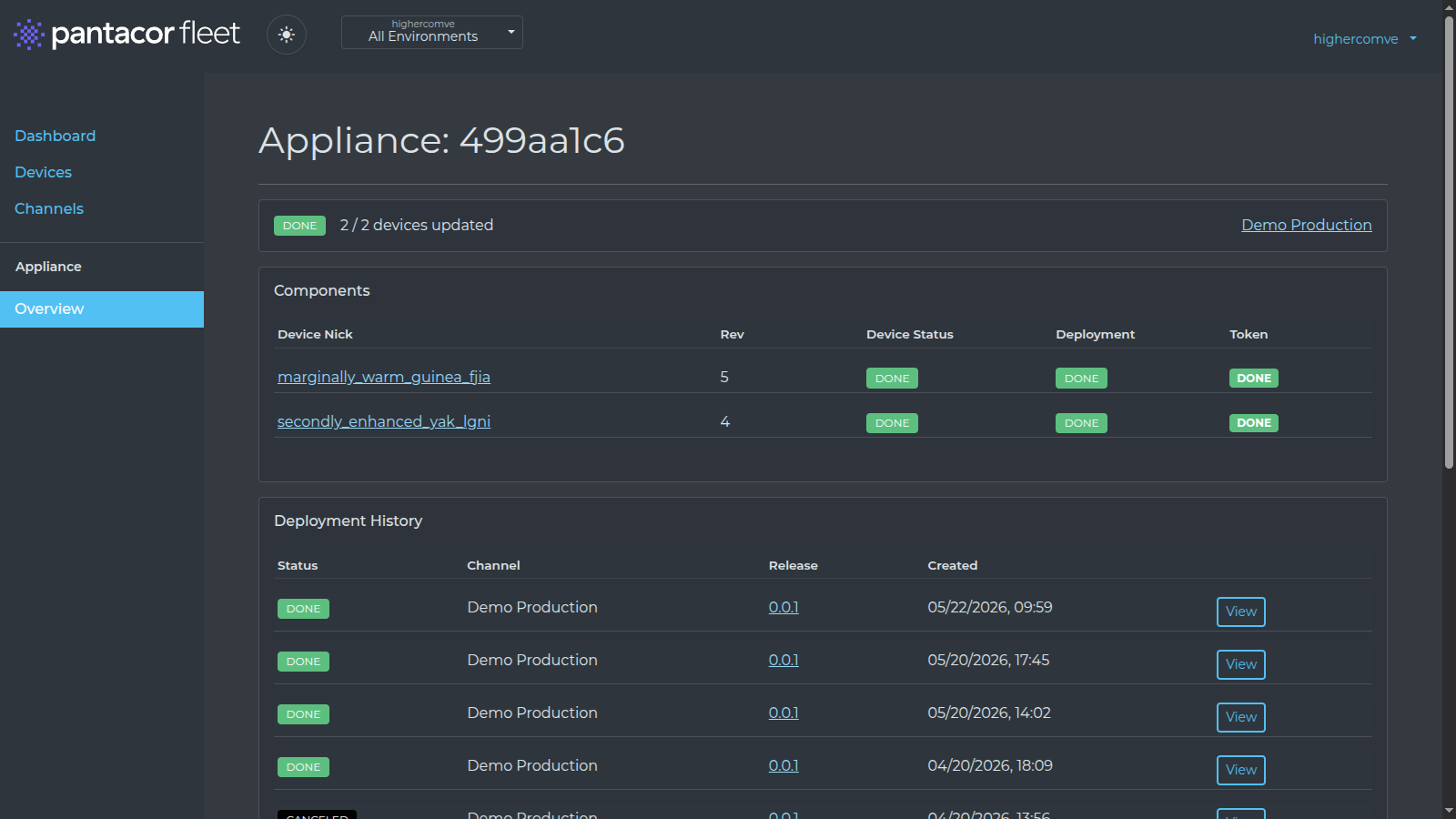
What you can see
Opening an appliance shows:
- A summary of the appliance model.
- Its associated releases.
- The component configuration that makes up the appliance.
Appliances are managed through appliance-type channels, where each component has its own source and ordering. This screen is the place to review an appliance's makeup and the releases tied to it.
If a release reaches an appliance before all of its component devices exist, the deployment waits and retries with a growing backoff instead of failing — see waiting for components.
Removing a component
If an appliance has extra or mismatched devices attached, you can remove a device directly from the appliance detail view. Click the remove button in the Actions column and type the device nick to confirm.
Removing a component disconnects the device from the channel and clears its appliance ID. Any in-flight deployments on that channel are marked as failed, while the device itself is kept and can be reassigned to a channel later. To find appliances with mismatched component counts across your fleet, run the Appliances with extra components audit report.